Cheryl's Original Post
Well, week 3 and it is chapters 5-8. There were many tidbits that I picked up from this reading of "The Art of Possibility". I will share my favorites with you. The first major ah ha moment for me came when the author told about getting in the taxi and the passenger tells the driver to hurry! They need me everywhere!!!! This is so true in life. As a mother or father, you are needed everywhere all of the time! You wish you could grow 8 arms and 8 legs. As a teacher it seems that every student needs help at the same time on a different problem. The next one that struck me was that power is the ability to make other people powerful. This thought we have heard before, but maybe not in this way. We may have heard it as give a man something to eat and he eats right then, teach him to grow his own food and he will be forever full. Here is another: grab what you love and give it everything. So often we tend to meander through life, giving what we feel comfortable giving, but to give it everything possible leaves the possibilities completely open! As I continued to move through the reading I came to a spot where the author asks us to think about putting Martin Luther King's "I have a dream" before every remark we make. Can you imagine? The last chapter was all about letting go. That is where this week's picture came from. We have to jump without worrying about every little thing to reach the highest and furthest that we can. I think of the movie "The Great Outdoors". We often forget that very simple command to let go. John Candy is water skiing and after giving his son lessons on safety and letting go of the rope if you get into a situation, he totally forgets this himself and his son is screaming for him to let go of the rope but he doesn't. I hope all of of us this week can let go of our ropes and travel further and accomplish more than we or anyone else could ever expect! Have a great week! Cheryl
Francine's Comment to Cheryl
Cheryl great post on this week's readings. I too was engrossed in the anecdotes that this book is offering. To me I feel that this book of possibilities has created a monster in me. I am planning to present many of these to my learners this year by placing posters and banners with the practices that Zander has offered in this book. I applaud your ability to come up with ah ha moments and take them and make them your own.

Showing posts with label fullsail. Show all posts
Showing posts with label fullsail. Show all posts
Sunday, August 21, 2011

Monday, January 24, 2011
PE4_ Wordle
Hi Again, my fellow Bloggers!
For my "RILS" plan I really wanted to use Tagxedo because students could have created awesome word clouds and I had planned to showcase their artwork in my room or in the hallway outside of my room. Unfortunately, I needed to download and install silverlight, which I assumed I needed to produce those wonderful word photos. I installed silverlight about 4 times, but each time I tried to create a cloud at the website, the URL would request that I download silverlight again. Quite frustrating!!!!
Since we were asked to keep it simple, I decided to use Wordle instead. I have more than 50 students in my classes that have IEP"s, that I was afraid to use a Web 2.0 tool that required more than inputting text into a document.
Students in Choir were asked to research their favorite singer/musician/group from the genre of their choice. Many of the students still seemed confused about doing research. The one question that got me was, "where do we get the information from to put into Wordle?" Of course I said my favorite phrase (JKMNTC).
I have students with Down's Syndrome, and other physical challenges, so I wanted everyone to be able to produce something using a relatively easy application (NCLB). Since finding the research is the most difficult part of my RILS plan, students will be able to create a project with a tool that they can go back to over and over again for fun or for future projects in other classes.
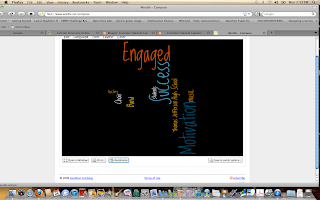 To use what I have created in Wordle into another application, I would take a screenshot and then crop it, copy and paste it where I want. The word clouds that you see below were created using the "advanced" button in Wordle.net. When you add weights ( i.e., 50 - 400) to the text, wordle uses that to create specific sized text which then makes it custom designed to your specifications. See screenshots on the left and below.

Same text, but I used the randomize button and it changed the color, placement and font on the next two screenshots.
For my "RILS" plan I really wanted to use Tagxedo because students could have created awesome word clouds and I had planned to showcase their artwork in my room or in the hallway outside of my room. Unfortunately, I needed to download and install silverlight, which I assumed I needed to produce those wonderful word photos. I installed silverlight about 4 times, but each time I tried to create a cloud at the website, the URL would request that I download silverlight again. Quite frustrating!!!!
Since we were asked to keep it simple, I decided to use Wordle instead. I have more than 50 students in my classes that have IEP"s, that I was afraid to use a Web 2.0 tool that required more than inputting text into a document.
Students in Choir were asked to research their favorite singer/musician/group from the genre of their choice. Many of the students still seemed confused about doing research. The one question that got me was, "where do we get the information from to put into Wordle?" Of course I said my favorite phrase (JKMNTC).
I have students with Down's Syndrome, and other physical challenges, so I wanted everyone to be able to produce something using a relatively easy application (NCLB). Since finding the research is the most difficult part of my RILS plan, students will be able to create a project with a tool that they can go back to over and over again for fun or for future projects in other classes.
 To use what I have created in Wordle into another application, I would take a screenshot and then crop it, copy and paste it where I want. The word clouds that you see below were created using the "advanced" button in Wordle.net. When you add weights ( i.e., 50 - 400) to the text, wordle uses that to create specific sized text which then makes it custom designed to your specifications. See screenshots on the left and below.
Same text, but I used the randomize button and it changed the color, placement and font on the next two screenshots.
 |
| Motivation + Engagement = Success!!! |
Subscribe to:
Posts (Atom)